Live Camera · On-Set Immersive 180 Monitor

Immersive 180
Camera Live
in Vision Pro.

On-set monitoring for the Blackmagic URSA Cine Immersive, the Canon R5C and R5 Mark II dual fisheye, and RED V-Raptor VR180 rigs. The NDI feed arrives on Apple Vision Pro as true 3D 180: remapped through the lens map, graded through your LUT, with REC tally and timecode in view. You are not looking at the shot. You are standing in it.
Included in the free Spatial Film app · Apple Vision Pro, visionOS 26 or later · Works with any Full NDI source

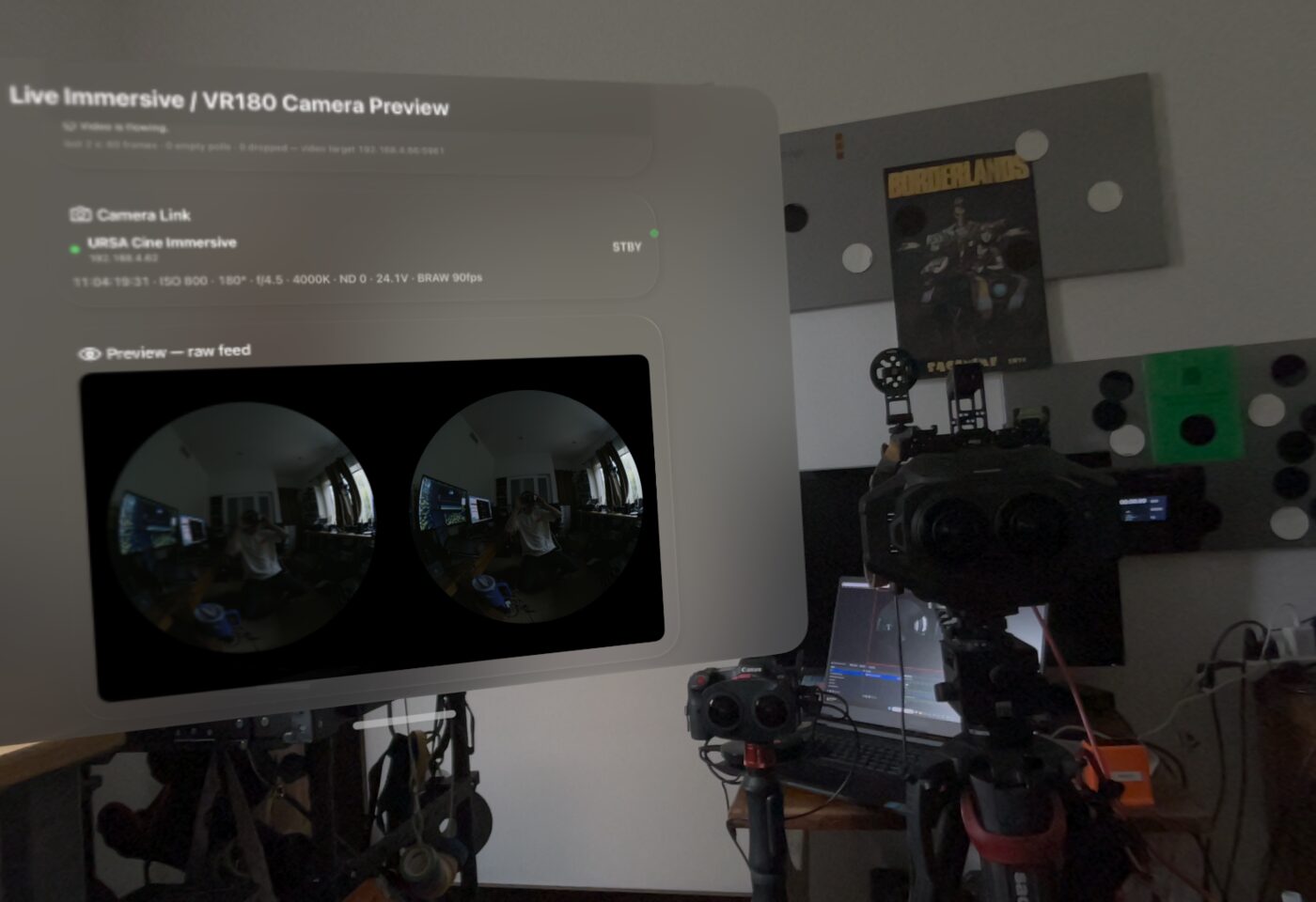
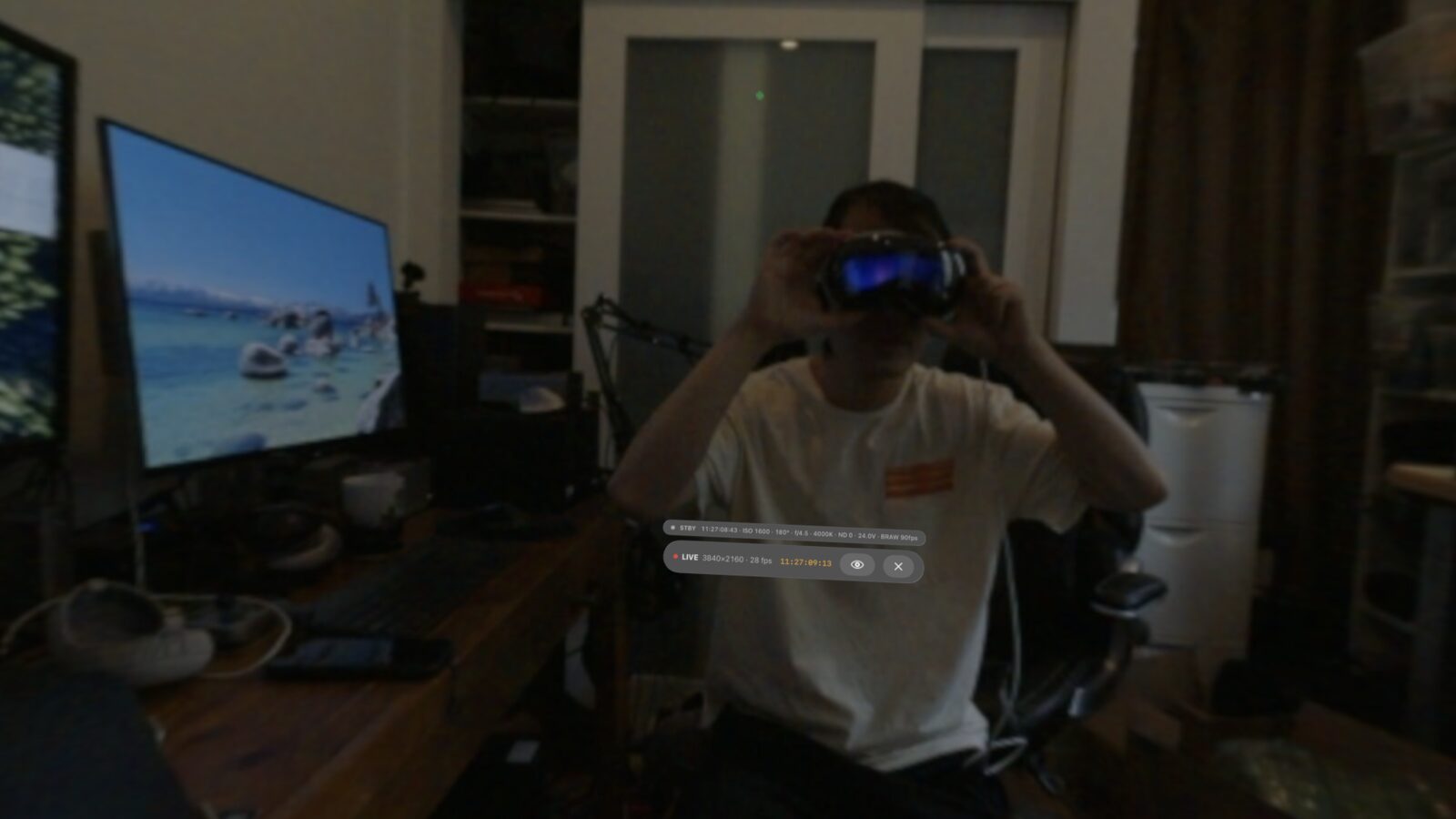
The Live Camera window in Spatial Film floating in Apple Vision Pro passthrough over a real URSA Cine Immersive rig, showing Camera Link telemetry and the raw dual fisheye preview
Real frame, real set, captured by Live Vision Pro.
REC 01:07:23:11 · tally and timecode, in the headset
The problem

Immersive film is shot blind.

Every monitor on an immersive 180 set shows two fisheye circles on a flat rectangle. The camera touchscreen shows them. The village monitor shows them. Everyone squints at warped circles and imagines what the audience will feel.

Scale, depth, headroom, how close is too close: the audience's view of all of it exists only after the footage comes back from post. So you block a scene, guess, and find out tomorrow. The URSA Cine Immersive's own direct-to-headset monitoring is still on Blackmagic's roadmap, and Canon's dual fisheye was never meant to be previewed live at all.

The one person who must see the shot the way the audience will, can't.

Live Camera fixes that with gear already on your cart: the camera's video output, NDI on your set network, and an Apple Vision Pro. No waiting for firmware. No post round-trip. The feed leaves the lens and wraps around your head, in stereo, while the scene is still lit.

Standing inside the live URSA Cine Immersive feed on Apple Vision Pro, with the LIVE 4K status, timecode and Camera Link telemetry floating in view
Live URSA Cine Immersive feed, with Camera Link tally, timecode and exposure in view.

Three rigs, one monitor

Pick your camera. It remembers.

Live Camera has a tab for each rig. Every tab keeps its own lens map and its own LUT, so switching cameras between setups is one tap, not a re-rig.

URSA Cine Immersive

The full Apple Immersive Video camera, monitored the way it shoots.

  • Built from the camera's ILPD. Our URSA map comes from the lens's own Immersive Lens Profile Data, the calibration Apple's pipeline reprojects from. Connect and it is already correct.
  • Tally, timecode, exposure. REC state, timecode, ISO, shutter angle, aperture, white balance, ND and battery voltage, floating in view while you're inside the shot.
  • Full 4K monitoring. An industry first. 3840×2160 at 30 fps, 12G‑SDI out → 4K NDI in. Full resolution from the sensor to your eyes, live.

Canon EOS VR

R5C and R5 Mark II dual fisheye, finally previewed as 3D 180.

  • Import the Canon STMap once. Download ours or build your own in DaVinci Resolve; the app remembers it.
  • Canon Log 3 and Log 2 built in. A LOG feed is graded live on the headset, so you judge the image, not the wash.
  • Full 4K at 60 fps. An industry first. 4096×2160 at 60 fps, HDMI out → 4K60 NDI in, with a smart network backup that keeps the feed smooth and sharp even when set Wi‑Fi misbehaves.

RED

V-Raptor VR180 rigs use the same one-time import.

  • Same STMap flow. Import the V-Raptor map, or any DaVinci float EXR for the lens you actually shoot.
  • Any .cube LUT. Bring the show LUT from your colorist and see dailies color, live.
  • Full 4K at 60 fps. An industry first. 4096×2160 at 60 fps, 12G‑SDI out → 4K60 NDI in, riding the same NDI backbone professionals trust for live sports and concert broadcasts.

Setup

Lens to headset in three steps.

1

Put the feed on the network as NDI

Camera SDI or HDMI into a capture device, then free OBS Studio (or any hardware NDI encoder) sends it to your set network. Wire the sender with Ethernet, because a full-quality 4K NDI feed wants a wired sender, and keep the Vision Pro on 5 GHz or 6 GHz Wi‑Fi on the same network. The headset itself stays completely wireless: no tether, no cable to trip over, no video village to be stuck in. The director or the client roams the set freely with the shot wrapped around them. The true VIP seat, and it walks with you.

Why NDI Vision Pro has no HDMI input and never will. NDI turns your set network into the cable. Low latency, gear you already know, and the same feed can hit village monitors at the same time.

2

Open Live Camera and pick your rig

Your NDI source appears by name; tap it, and the flat preview starts. Pick the camera tab. URSA is ready out of the box, Canon and RED remember the STMap you imported. Shooting LOG? Pick the built-in Canon Log 3 or Log 2 LUT, or import the show LUT as a .cube.

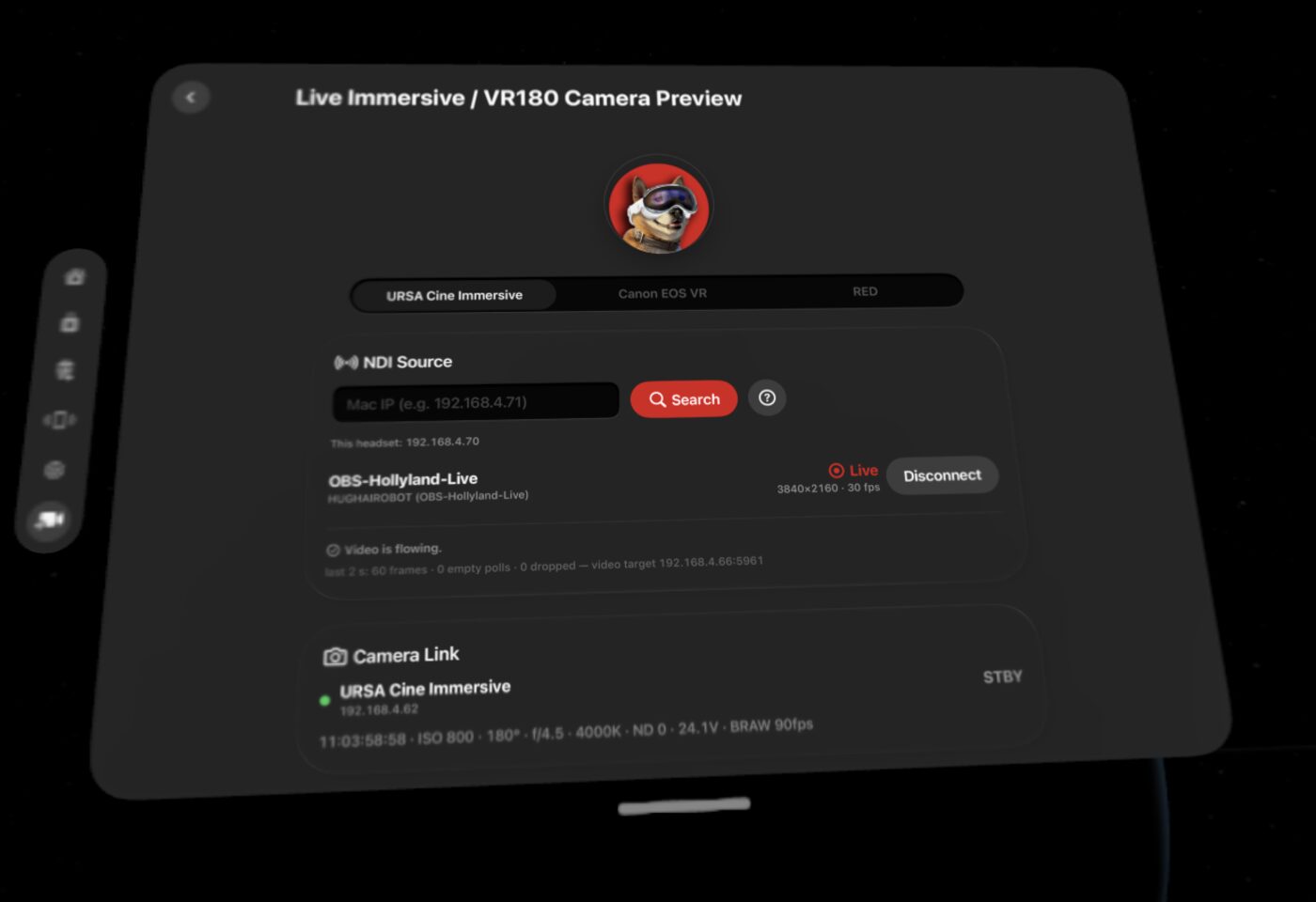
The Live Camera page in Spatial Film on Apple Vision Pro: URSA Cine Immersive, Canon EOS VR and RED camera tabs, a live 4K NDI source, and Camera Link telemetry
3

Step inside the shot

Tap Watch Live in 3D 180°. The headset's GPU remaps the fisheye feed through the lens map into true 3D 180 around you, graded, with adjustable 3D depth. On the URSA, REC tally and timecode ride along. Frame, block, light, and judge depth while the scene is still lit.

Need your crew? You never take the headset off. One tap drops you into Vision Pro's passthrough, the best of any headset, and the real set is right there. Give the note to your DP, talk to your talent, then one tap back into the 4K camera view. Directors direct. Now they do it inside Apple Vision Pro.

The safety net Set Wi‑Fi is hostile, so Live Camera is engineered to keep the feed alive through it. A director's monitor should never go black. This one doesn't.

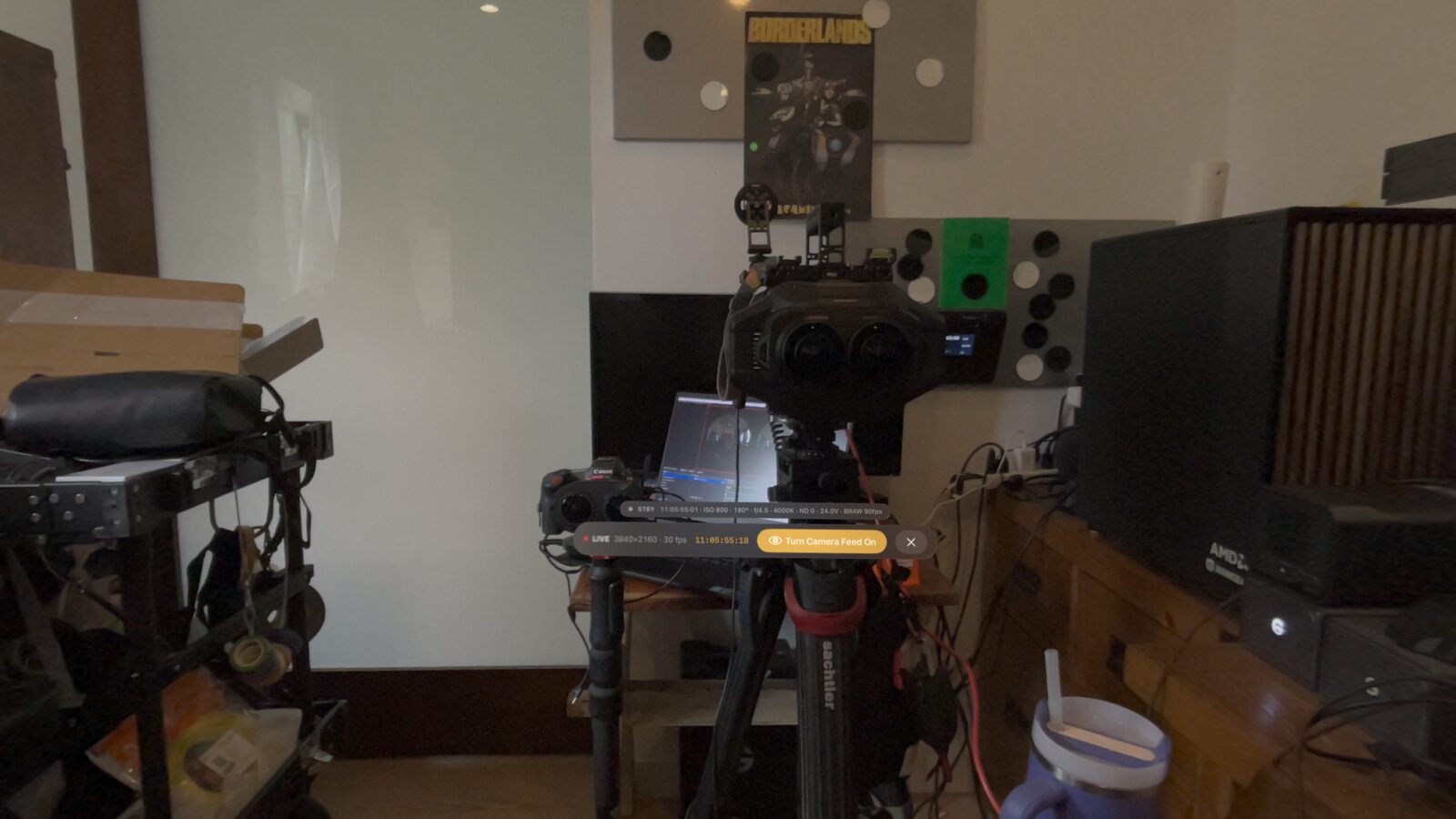
Vision Pro passthrough showing the real URSA Cine Immersive rig with the floating LIVE 4K status, timecode, and the one-tap Turn Camera Feed On button

What's in the kit

Built by a working immersive crew.

True 3D 180

Not a flat screen floating in space, and not a mono wrap. Left and right eye, remapped per eye on the headset's GPU, with 3D depth you can tune to the rig's interaxial.

Lens maps (STMap)

The URSA Cine Immersive map is built in, generated from the camera's own ILPD lens calibration, so what you frame on set is what lands in final delivery. Canon R5C, R5 Mark II and RED V-Raptor maps import once and stay in the library. Or export your own float EXR from DaVinci Resolve for any fisheye lens. Every URSA body carries its own factory calibration and they vary very slightly, so studios that need the map matched to their exact camera can commission one from that body's ILPD.

Live color

Canon Log 3 and Canon Log 2 conversions ship in the app. Import any standard .cube to see the show LUT live. The grade applies to the flat preview and the immersive view alike.

Camera telemetry

URSA Cine Immersive over Ethernet: REC tally, timecode and exposure read directly from the camera and follow you into the immersive view. No camera-side setup.

Any NDI source

The camera tabs are presets, not locks. Anything that speaks Full NDI can be received, and an already-equirect 180 feed displays correctly with no lens map at all.

Optional camera control · Coming

Next: direct URSA Cine Immersive camera control from inside the headset. The DP's dream: stand where the audience sits and reach every camera setting without ever stepping out of the shot.

Track Record

Trust the source that invented the workflow.

The STMap live-preview workflow inside this app didn't come from a lab. It came from our own sets, and the tutorial that documents it has become the industry's reference: broadcast companies and every live-camera app with a VR mode build from it.

Live Camera is that same workflow, from the people who invented it, now on Apple Vision Pro exclusively. It monitors immersive and VR180 productions for Hollywood studios, professional broadcasters and live concert events around the world. We can't name names, but "trusted by professionals worldwide" is not an overstatement.

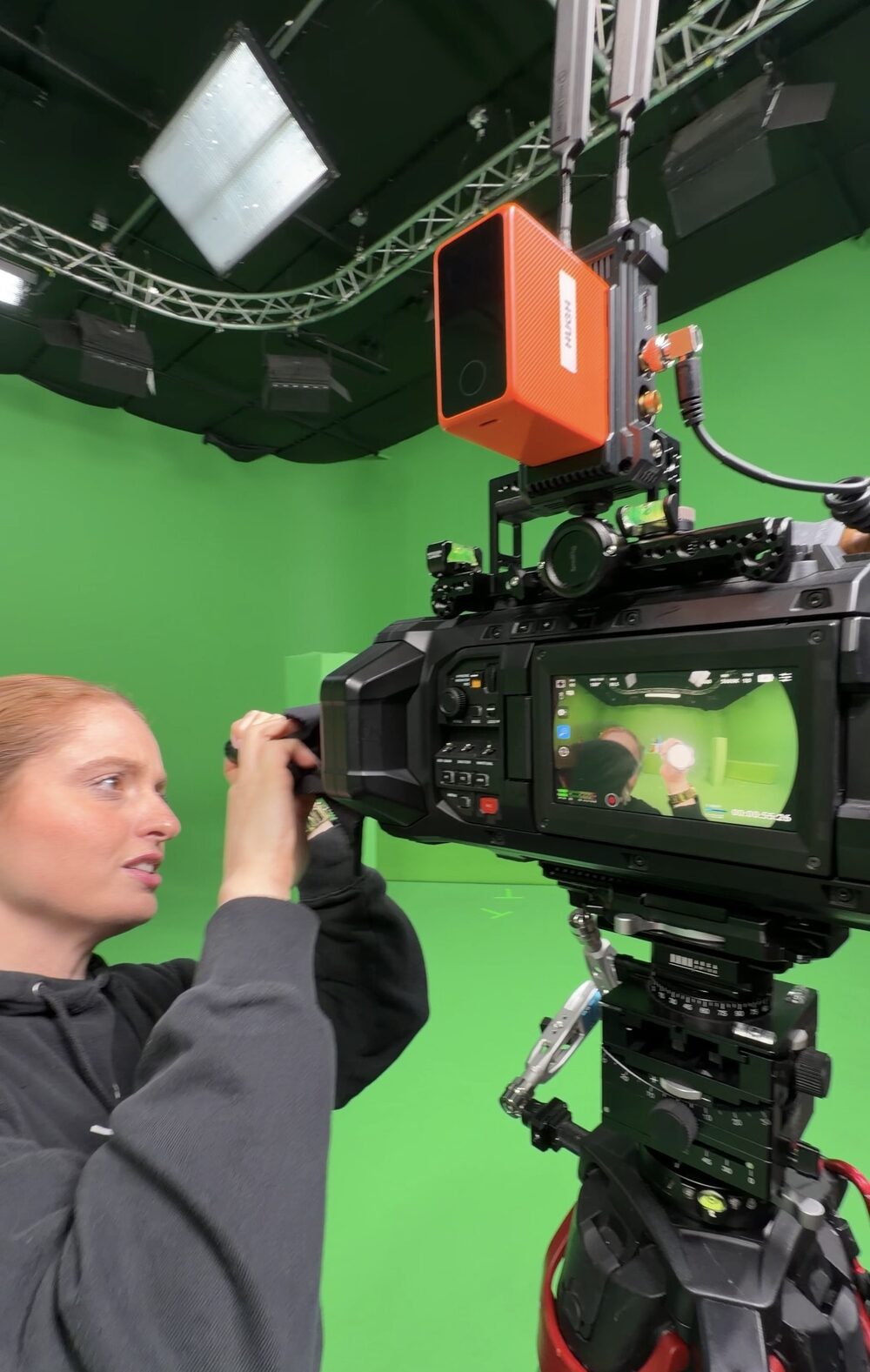
A camera operator lining up an URSA Cine Immersive with an NDI encoder mounted on top, on a green screen stage

Questions

Asked on every set so far.

Can you monitor the URSA Cine Immersive live on a Vision Pro?

Yes, that's this page. The camera's own direct-to-headset streaming is still on Blackmagic's roadmap, but you don't have to wait: SDI out, NDI onto the set network, and Live Camera remaps the feed into 3D 180 with the built-in URSA lens map, generated from the camera's own ILPD lens calibration. Tally and timecode ride along over the camera's Ethernet REST link.

Does it work with the Canon R5C dual fisheye?

Yes, R5C and R5 Mark II. The dual fisheye HDMI feed goes out over NDI, and the Canon tab remaps it with a Canon STMap you import once. Canon Log 3 and Log 2 LUTs are built in, so the LOG image looks right in the headset. RED V-Raptor rigs use the same import flow.

How much delay is there?

A few frames behind the lens on a healthy network. NDI on a local network typically runs in the tens of milliseconds, and the headset adds its GPU remap. It's a monitor for framing, blocking, lighting and depth, not a zero-latency operator viewfinder.

Do I need a subscription?

No. Live Camera is included in the free Spatial Film app. The app's film catalog subscription is a separate thing and isn't required for any of this.

What exactly do I need on the cart?

Your camera, an NDI sender, and a Vision Pro. The simplest sender is a laptop with a capture card running free OBS Studio; hardware NDI encoders work too. Bring a dedicated router, wire the sender with Ethernet, keep the headset on 5 GHz or 6 GHz. That's the whole kit.

My camera isn't on the list. Am I out?

Probably not. Any Full NDI source can be received. If your feed is already equirect 180, it displays correctly with no lens map. If it's fisheye, export an STMap for your lens from DaVinci Resolve and import it. The tabs are presets, not a gate.

The audience's seat, on set.

Camera, NDI, headset. That's the whole monitor cart.

Get Spatial Film on the App Store

STMaps, LUT files and the full technical walkthrough live on Hugh's Patreon →